
App for Mac & Windows
Infinite Profile Manager
Back up, restore and sync your Photoshop setup. The same actions, brushes and shortcuts on every computer you work on.
Free with any other Infinite Tools product
Bought one of our plugins or apps? Then Infinite Profile Manager is yours at no cost. Sign in to your account and it is added to your license, for new purchases too. This offer runs until 30 November 2026. How it works
Counts: products you paid for on infinite-tools.com. Does not count: free downloads, assets and products sold by our partners.
Prices in your local currency. Sold by our reseller FastSpring (merchant of record), which handles taxes such as VAT in the checkout · Terms of sale
- App for Mac (Apple silicon) and Windows
- Photoshop 2020 or later
- License for 3 computers
Your Photoshop, on every computer
Back up, restore and sync
Back up your setup in one step, restore it when you need it and keep your computers in sync, with a restore point before every restore.
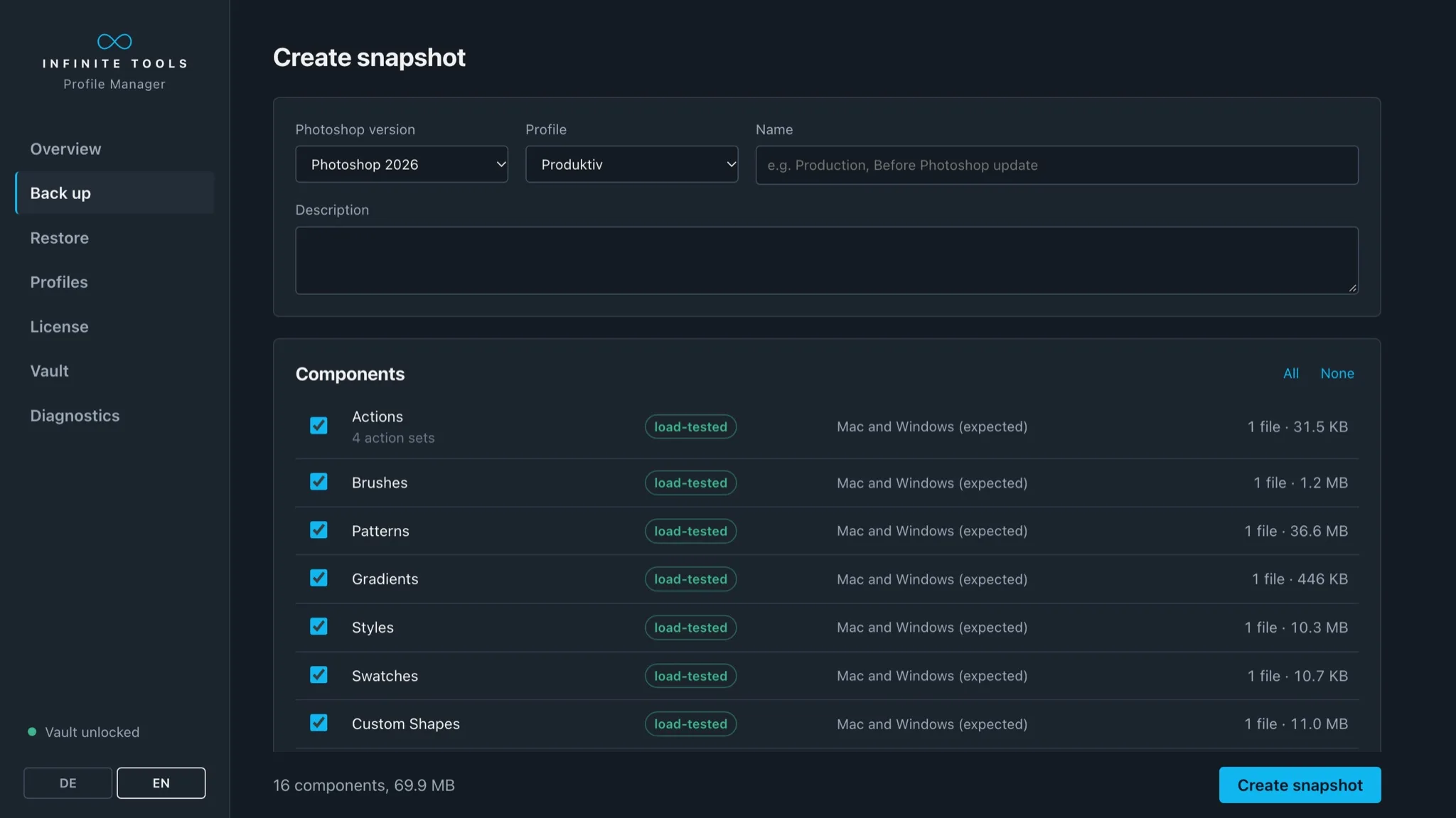
Years of presets and shortcuts live in Photoshop’s settings folders, and a fresh install or a new computer leaves them behind. Infinite Profile Manager backs up your workspace as one snapshot: actions, brushes, patterns, gradients, styles, swatches, custom shapes, tool presets, keyboard shortcuts, workspaces, menus, toolbars, color settings, document presets, LUTs, scripts and preferences.
Backups are stored encrypted in a folder of your choice. Put that folder in the cloud or on a NAS, and every computer you work on reaches the same snapshots: back up on your desktop, restore on your laptop, and both work the same way.
See How It Works

Plays via YouTube (Google) – nothing loads before your click. Watch on YouTube : See How It Works
Features
Back up
Pick the Photoshop version, the profile and the parts you want, give the snapshot a name and save it. Every snapshot shows its date, Photoshop version, system and size.
Restore with a way back
Before every restore the app creates a restore point. If the result is not what you expected, you return to the previous state.
Encrypted backups
Snapshots are stored encrypted in your backup folder. Your license key opens this vault, on this computer and on a new one.
Sync your computers
Use a synced cloud folder or a NAS as your backup folder. Back up on one computer and restore on the other, and your desktop and laptop share the same actions, brushes and shortcuts. On a new computer, install the app, enter your license key and restore.
Key Features
- Backs up actions, brushes, patterns, gradients, styles, swatches, custom shapes and tool presets.
- Backs up keyboard shortcuts, workspaces, menus and toolbars.
- Backs up color settings, document presets, LUTs, scripts and Photoshop preferences.
- Stores backups encrypted in a folder of your choice, including a cloud folder or a NAS.
- Syncs your setup between your computers through that shared folder.
- Creates a restore point before every restore.
- Your license key opens your backups on a new computer too.
Free for Infinite Tools customers
If you own one of our products, Infinite Profile Manager is included at no cost. You find the download in your Account, and the license key you already have opens the app. Every new purchase of one of our products includes it as well. This offer runs until 30 November 2026.
Requirements & License
| Requirements |
|
|---|---|
| License |
|
| Price | |
| Trial | No trial version – but if you’re not happy, you get your money back within 30 days of your purchase. |
FAQ
How do I get the download and my license key?
After your purchase, our fulfillment partner FastSpring sends you an email with your license key. You download the software in your Account: sign in with the email address of your purchase.
More questions? Visit support – we try to answer every ticket within 24 hours.
Get Infinite Profile Manager
Back up, restore and sync your Photoshop setup. The same actions, brushes and shortcuts on every computer you work on.
- App for Mac (Apple silicon) and Windows
- Photoshop 2020 or later
- License for 3 computers